The short version
A tech rider is the one-page document that tells a venue what your show needs: who is in the band, what you bring, what you need from the house, how the monitors should be set, where the power goes, and how long you need to set up. The stage plot and input list are attached as page two. It is a request, not a contract, and the tone should say so.
01 The tool above
A free tech rider maker, no account at any step.
People look for this under a few names: tech rider template, tech rider maker, tech rider creator, tech rider generator, technical rider builder. They are all the same thing, and it is the tool at the top of this page: a form you fill in, in your browser, that turns into a PDF a venue can print.
- No account, ever. Not to start, not to download the PDF, not to share a link. Nothing is uploaded; your rider is saved in your own browser.
- Free PDF, as many times as you like. No watermark and no ads. The sheet carries one small credit line at the foot.
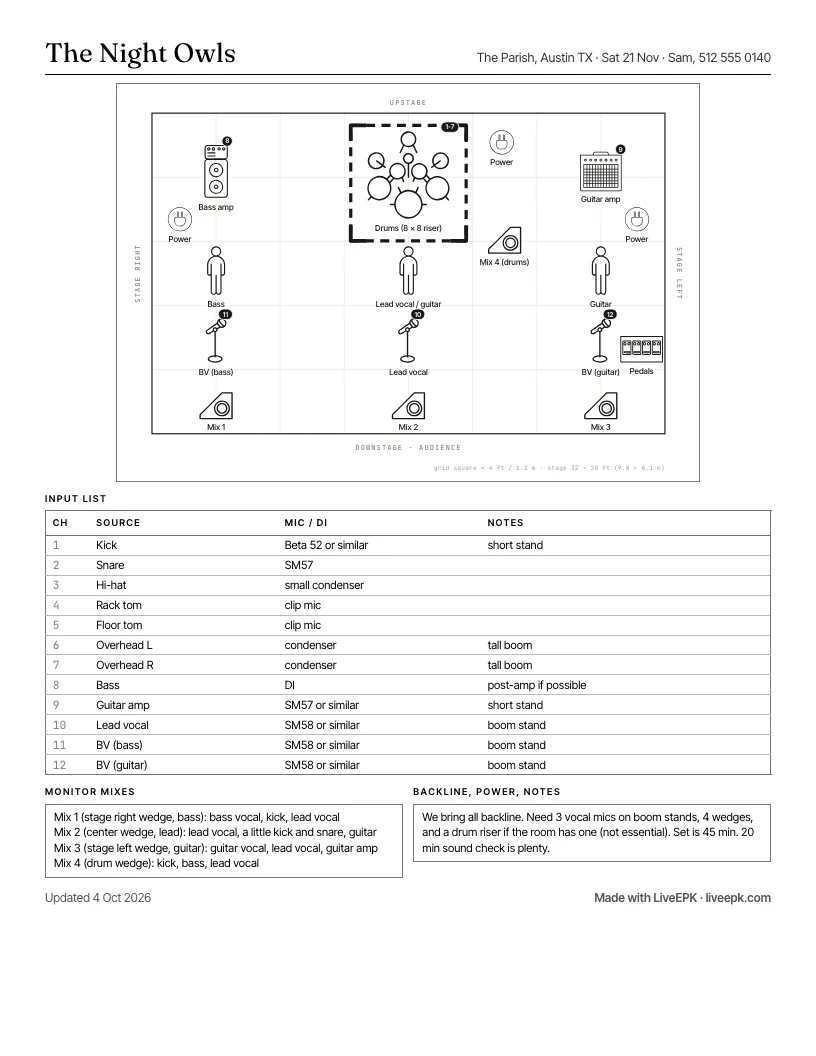
- Two pages. The written rider on page one; the stage plot, input list, and monitor mixes on page two.
- A third page when you need it: the Hospitality rider tab covers food, rooms, guests and parking. The hospitality rider template opens straight on it, with an example.
- Six example riders to start from: 4-piece rock band, 7-piece with keys and horns, singer-songwriter duo, solo acoustic, jazz trio, and DJ.
- The input list builds itself as you place mics and DIs on the stage plot, and you can edit any cell.
- Prefer a document? There is a Word and Google Docs version of the template further down.
- Letter or A4, with stage sizes in feet here and in meters on the Spanish version.
- Works on a phone, for the fix you need to make from the van.
- Keep it with your press kit, if you want. The free EPK builder publishes the rider in your kit's Downloads section, next to the photos and bio a booker opens anyway.
How that compares with the other free tools is on its own page: free stage plot and tech rider makers, compared.
02 Rather work in a document?
Tech rider template for Word and Google Docs.
The tool above is the fast way, because it draws the stage plot and builds the input list for you. If your band lives in Word or Google Docs, here is the same two-page tech rider as a blank file: the written rider and monitor mixes on page one, then an empty stage to draw your plot on and a 12-row input list on page two. Every box has a short gray hint saying what goes in it, and the filled-in example to copy from is further down this page.
- Download the tech rider template for Word, US Letter .docx, 20 KB
- Download the tech rider template for Word, A4 .docx, 20 KB
- Tech rider template for Google Docs: make your own copy, US Letter or A4. It asks you to sign in to Google, then the copy is yours and nobody else can see it.
The same file opens in Pages and LibreOffice. No email, no signup, and nothing in it but the template and one credit line in the footer. Draw on the empty stage by hand or with shapes, or make the plot in the tool above, press PNG, and paste it over the empty stage. Either way, send the finished rider as a PDF, not as a Word file.
03 What a tech rider is for
What a tech rider is for: one email, no surprises.
The venue's engineer reads your rider the afternoon of the show, usually on a phone, usually while doing three other things. From it they need to know how many channels to patch, how many wedges to drag out, whether you need a drum riser, and whether anything about your set is unusual. A rider that answers those questions on one page gets read and followed. A rider that runs to twelve pages for a bar band gets skimmed, and then ignored, and then you are explaining the click track at sound check with fifteen minutes to doors.
It also sets expectations in both directions. Writing "we bring all backline" means nobody at the venue spends the afternoon looking for a bass amp. Writing "4 wedges on 3 mixes minimum" means the engineer knows what you can live with. The rider is where you say what is essential and what is a preference, so the room can do its best with what it has.
04 What goes in it
What goes in a tech rider: the short list first, then the detail.
- Contact. The name and phone number of whoever answers on show day. It goes at the top, not in the email.
- The facts line. How many inputs, how many monitor mixes and whether they are wedges or in-ears, how many power drops, and who mixes. The template writes this line for you from the stage plot, so the two cannot disagree.
- What you cannot play without. One or two lines: the mics, DIs and mixes the show needs. Everything after it reads as a preference, which is how an engineer wants to read it.
- Lineup. Who is on stage and what each person plays. The engineer counts vocal mics from this line.
- Schedule. Set length, how much sound check you actually need, and load-in: how many people, how many vehicles, how many minutes to set up.
- What you bring. Backline, cables, stands, in-ear packs. Everything the venue does not have to supply.
- What you need from the venue. PA and engineer, vocal mics and stands, drum mics, DIs, how many wedges and mixes, a riser if you want one. This is the section the engineer reads twice.
- FOH and power. Whether the house engineer mixes or you travel one, and where on stage you need power drops.
- Lighting. One sentence. "House wash, no strobes" is a real instruction and most small acts have nothing more to say.
- Monitor mixes. One line per wedge: who it is for and what they need to hear more of.
- Input list. Every channel in the order engineers expect: drums, bass, guitars, keys, other instruments, vocals.
- Stage plot. The drawing. Where everyone stands, where the amps and wedges and power go, with stage left and right labeled.
- Festival details, optional. Changeover time, wireless gear, crew and vehicle count, and what backline you can share. Leave it empty for a club show and it does not print.
- Hospitality, optional. Water on stage, a green room if there is one, guest list, parking. Two or three lines for a local act; a separate document for a touring one. Turn on the Hospitality rider tab and those lines move to their own page, off the technical one.
The template above has a field for each of these. The monitor mixes and input list sit under the tabs because the stage plot shares them, and the plot itself is the other tab. Every page prints the day it was last changed and its place in the document ("Page 1 of 2"), because festivals hand the pages to different people and an old copy is the complaint engineers make most.
05 An example tech rider
Tech rider example: what a working 4-piece sends.
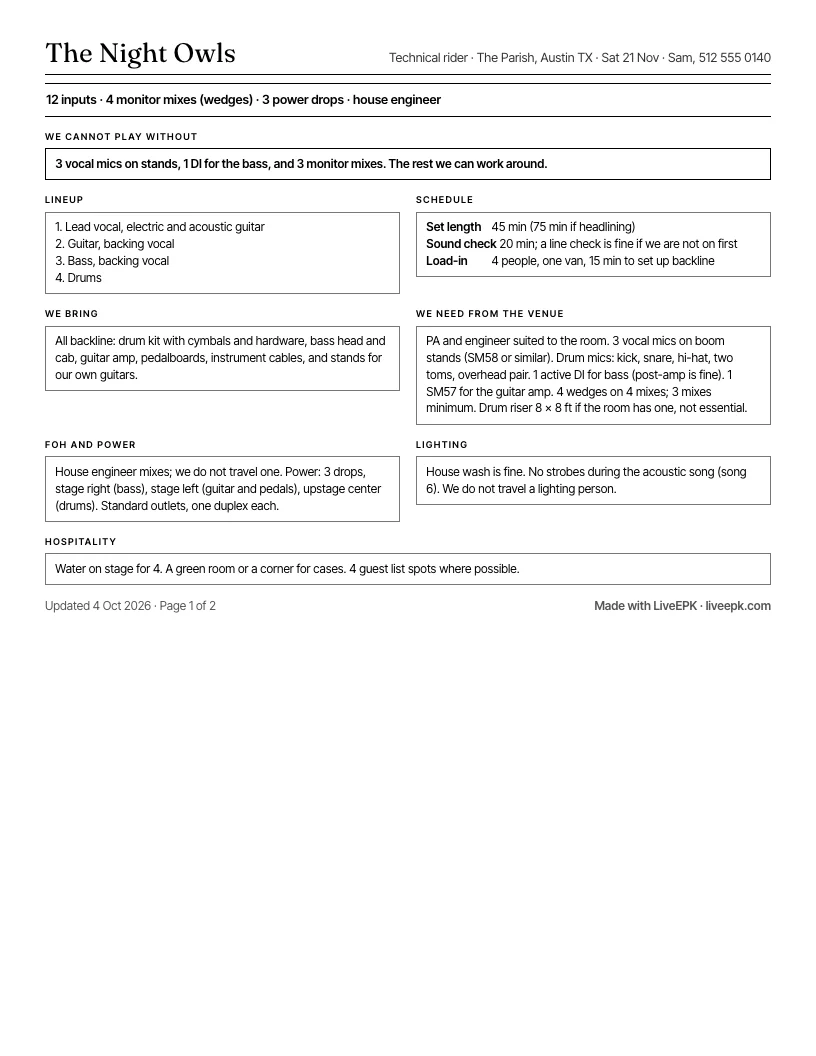
This is the 4-piece rock band preset from the template, laid out the way it prints. Page two would be the stage plot, the twelve-row input list, and the four monitor mixes. The line under the name is written by the template from the plot. The box after it is the short list the band cannot play without; nothing below it is a demand, every specific mic says "or similar," and the two things that do not matter much (the riser, the strobes) are labeled as preferences.
We cannot play without
3 vocal mics on stands, 1 DI for the bass, and 3 monitor mixes. The rest we can work around.
Lineup
1. Lead vocal, electric and acoustic guitar 2. Guitar, backing vocal 3. Bass, backing vocal 4. Drums
Schedule
Set length: 45 min (75 min if headlining) Sound check: 20 min; a line check is fine if we are not on first Load-in: 4 people, one van, 15 min to set up backline
We bring
All backline: drum kit with cymbals and hardware, bass head and cab, guitar amp, pedalboards, instrument cables, and stands for our own guitars.
We need from the venue
PA and engineer suited to the room. 3 vocal mics on boom stands (SM58 or similar). Drum mics: kick, snare, hi-hat, two toms, overhead pair. 1 active DI for bass (post-amp is fine). 1 SM57 for the guitar amp. 4 wedges on 4 mixes; 3 mixes minimum. Drum riser 8 x 8 ft if the room has one, not essential.
FOH and power
House engineer mixes; we do not travel one. Power: 3 drops, stage right (bass), stage left (guitar and pedals), upstage center (drums). Standard outlets, one duplex each.
Lighting
House wash is fine. No strobes during the acoustic song (song 6). We do not travel a lighting person.
Hospitality
Water on stage for 4. A green room or a corner for cases. 4 guest list spots where possible.
Change the preset in the template to see the same rider for a duo, a solo acoustic act, a jazz trio, a 7-piece with keys and horns, and a DJ. Each one is written the way that kind of act really advances a show, so most people only need to change the names, the numbers, and the date. All six riders are written out, each with a PDF to download, on the tech rider examples page, and laid out with their stage plots on the stage plot examples page.
06 Three documents people mix up
Tech rider vs stage plot vs hospitality rider.
The stage plot is the drawing: a top-down view of where every performer, amp, monitor, mic, and power drop goes, with an input list next to it. Engineers patch from it. If you only send one thing to a bar, send this. The stage plot maker is the same tool as this page, opened on the drawing.
The tech rider is the document around the plot: lineup, schedule, backline, what you need, power, lighting, monitors, and the plot attached. Clubs, support slots, festivals, and any show with a production manager want this. For a small act it is one page of text plus the plot.
The hospitality rider is about the people, not the show: food, drinks, dressing room, guest list, parking, accommodation. Touring acts send it as a separate document because it goes to a different person at the venue. A local or regional act writes two or three lines at the bottom of the tech rider and stops. Asking a 100-cap room for a fruit plate is how you get remembered for the wrong reason. When there is more to arrange, the hospitality rider template is the same tool opened on that page.
Festivals often send their own "technical advance" form. Your rider is what you copy the answers from, so keep one current version and fill in their form from it.
07 Writing it so it gets read
How to write a tech rider: requests, not demands.
- Say what is essential and what is preferred. "3 mixes minimum, 4 if possible" tells the engineer where the floor is. A list of twelve requirements with no ranking tells them nothing.
- Write "or similar" after any mic model unless you bring it. The engineer needs to know dynamic, condenser, or DI, and short stand or tall boom. The brand is a preference.
- Keep the text to one page. The plot and input list are page two. If your rider is longer than that, you are either a very big act or you are padding.
- Put a phone number at the top. The rider gets forwarded, printed, and separated from the email. The number should survive that.
- Date it and name the file. night-owls-tech-rider-2026.pdf beats rider_final_v3.pdf. When the lineup changes, the year changes.
- Do not copy a touring act's rider. The famous ones are online and they are wonderful reading, but a four-piece asking for a 48-channel console and a tour bus parking spot at a Tuesday club show is not going to get either, or the gig back.
- Do not send it as a Word file. A PDF opens the same on every phone and keeps the plot with the text.
08 DJ tech rider
DJ tech rider template: shorter, and mostly about the table.
A DJ rider is the easiest one to write and the one venues most often never receive. What matters: what you bring (laptop and controller, or you play on the club's decks), the models you need if you play on house gear ("2 x CDJ-3000 and a DJM-900 or similar"), how you connect to the house (two XLR or two DIs from your mixer), booth monitors, and a stable table at a stated height with power at it. Set length, and whether you can extend. That is the whole rider. The DJ preset in the template fills it in; swap the gear names and you are done. There is a DJ tech rider template page that opens on that preset, with a full example and the three gear lines (controller, house CDJs, vinyl) written out.
09 Sending and keeping it
How to send a tech rider: one version, everywhere.
Attach the PDF to the advance email a week before the show, and put the same PDF in the Downloads section of your EPK next to the press photos and the bio (the free EPK builder includes that section). Bookers already open that link for photos; production people can grab the rider from it without asking you, and a festival's advance form can point at it. When the lineup changes, you update one file in one place. If you do not have a press kit yet, the music press kit template lays out every section, and how to make an EPK gets you from a folder of files to one link in about twenty minutes.
Keep the venue and date fields generic in the copy you host ("Standard rider, 2026") and fill them in per show when you export for a specific advance. The template above saves in your browser, so that is a thirty-second job.
Are you a DJ? The DJ example here is half the job. The other half is the page you send with it: see how to build a DJ press kit, with DJ bio examples and a full sample kit.
10 Quick answers
Tech rider template: common questions.
- How do I create a tech rider?
- Start with the short list you cannot play without. Then list who is in the band and what they play, how long your set is and how much sound check you need, what backline you bring, what you need from the venue (PA, mics, DIs, wedges), where you need power, one line on lighting, and a contact phone number. Attach a stage plot and an input list. Keep the text to one page and write it as requests, with "or similar" after any specific gear. The template above does all of that from a preset and exports a two-page PDF.
- Can you give an example of a tech rider?
- A 4-piece rock band's rider fits on one page: lineup (lead vocal and guitar, guitar and backing vocal, bass and backing vocal, drums), set length 45 minutes, 20 minute sound check, load-in of 4 people and one van, all backline brought, need from the venue a PA with engineer, 3 vocal mics on booms, drum mics, a bass DI, an SM57 on the guitar amp, and 4 wedges on 3 or 4 mixes, power at stage right, stage left, and upstage, house lighting with no strobes, and water for 4. Page two is the stage plot with the input list and monitor mixes. That rider is laid out in full in the example on this page, and it is the default preset in the template, so you can download it as a PDF right now and edit from there. The other presets are examples for a duo, a solo acoustic act, a jazz trio, a 7-piece, and a DJ.
- Is a tech rider the same as a stage plot?
- No. The stage plot is the drawing of where everyone and everything goes on stage. The tech rider is the document around it: lineup, schedule, backline, what you need from the venue, power, lighting, monitor mixes, and the input list, with the plot attached. The Stage plot tab above is the drawing; the Tech rider tab is the rest.
- What is the difference between a tech rider and a hospitality rider?
- The tech rider covers the show: sound, stage, power, lighting, schedule. The hospitality rider covers the people: food, drinks, dressing room, guest list, parking, accommodation. Touring acts send two documents; a local act writes two or three hospitality lines at the bottom of the tech rider and leaves it there.
- Do I need a tech rider for a bar gig?
- A short one helps, and it does not need to be formal. A stage plot with an input list and five lines of text (what you bring, what you need, set length, sound check time, a phone number) is a complete tech rider for a bar or small club. Send it with the advance email a week out.
- Should a tech rider be a Word document or a PDF?
- Write it wherever you like, and send a PDF. Engineers print it or open it on a phone, and a PDF looks the same everywhere, keeps the plot with the text, and cannot be edited by accident. Your editable version can live here in your browser, or in the Word and Google Docs template on this page.
- Is there a free tech rider maker or generator that needs no account?
- Yes, this one. The LiveEPK tech rider template is a tech rider maker (some people say creator, generator, or builder) that runs in your browser. You can fill in the rider, draw the stage plot, download the two-page PDF, and copy a share link without signing up for anything. An account is only needed if you want the rider saved with a LiveEPK press kit.
- Is the LiveEPK tech rider template really free, and where does my rider go?
- Free, no account. The rider and the plot are saved in your own browser and in the share link, nowhere else. Download the PDF and it is yours. If you want it kept with your press kit, "Save it to your EPK" carries the rider into a free LiveEPK account, where you can publish it to your Downloads section.
Send the rider from the same link as the photos.
Sign up free and the rider you just filled in comes with you: saved to your account, published to your EPK's Downloads in one click, and updated in one place when the lineup changes. Bookers open that link for the bio and photos anyway; production grabs the rider from the same place. Free to build and publish, no credit card.
Save this rider to my EPKNot sure what free includes? See the free EPK builder: every template, publishing, and the Downloads section, with no trial clock.